An SEO template plugin for the title and meta description tags in Joomla: variables in a template are replaced with the page's real data. Templates and variables come from provider plugins for each component.
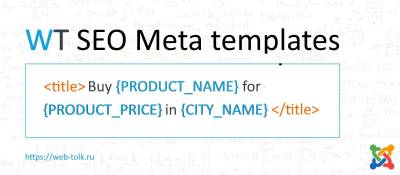
WT SEO Meta templates removes the need to write the title and meta description by hand for every page: instead, a template with variables is set up. For example, an article title can be built from the article heading and a custom field value, and the description from the intro text. The plugin works with Joomla articles, tags, the VirtueMart and JoomShopping stores, Phoca Gallery and the My City Selector component.
How it works
At least two plugins are needed:
- the main WT SEO Meta templates plugin (system);
- a provider plugin for the component in question, for example VirtueMart.
The provider creates variables and SEO templates and passes them to the main plugin, which replaces the variables with their values in the title and meta description tags. All template settings are made in the provider plugin.
Template examples
- Article title template:
{CC_ARTICLE_TITLE}. {CC_ARTICLE_FIELD_14_TITLE} {CC_ARTICLE_FIELD_14_VALUE}— the article title, followed by the name and value of custom field ID 14. - Meta description template:
{CC_ARTICLE_INTRO}— the article intro text trimmed to a set number of characters.
Provider plugins
- WT SEO Meta templates - Content — Joomla articles and categories.
- WT SEO Meta templates - Tags — the Joomla tag list and items by tag.
- WT SEO Meta templates - Virtuemart — VirtueMart online store.
- WT SEO Meta templates - JoomShopping — JoomShopping online store.
- WT SEO Meta templates - MyCitySelector — the My City Selector multi-region component.
- WT SEO Meta templates - Phoca Gallery — Phoca Gallery image gallery.
Pagination pages SEO
The Content, Tags and JoomShopping providers add a suffix such as "- page NNN" to the title and meta description on category pagination pages, so that these pages do not duplicate the first one.
Installation
- Install the main WT SEO Meta templates plugin.
- Install the providers for the components in use. Since version 2.0.4 providers are installed manually: automatic installation has been disabled to avoid errors if the remote server is unavailable.
- Configure templates and variables in each provider.
Compatibility and requirements
- Joomla 4, 5 and 6 (since version 2.0.0 the plugin uses the Joomla 4 plugin structure and does not run on Joomla 3; Joomla 6 compatibility since version 2.0.4).
- Free extension.