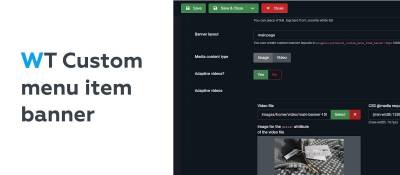
A Joomla 4 and 5 plugin for menu item banners: responsive images and videos with custom breakpoints. The developer builds the front-end output from sample code or custom layouts.
WT Custom menu item banner gives Joomla menu items their own banner, either an image or a video. The banner files and settings are stored in the menu item parameters, while the site developer decides how the banner looks on the page. The plugin is not a one-click solution: the banner output has to be built by hand, starting from the sample code. This requires knowledge of HTML, CSS and basic PHP.
Features
- Responsive images and videos: a landscape version for desktops (PCs, laptops, TVs) and a portrait version for mobile devices.
- Any number of breakpoints, i.e. screen resolution ranges with their own image or video. Conditions use CSS
@mediaquery syntax. - Lazy loading of video: a script checks which video matches the screen and loads only that one.
- A Use banner switch in the menu item settings.
- Custom banner layouts in the plugin folder (since version 1.2.0); the layout is chosen in the menu item's banner settings.
Displaying the banner
The sample code reads the banner parameters of the active menu item and, if the banner is enabled, renders the selected layout from plugins/system/wt_custom_menu_item_banner/tmpl. The code can go straight into the template's index.php, or into a custom layout for the Custom (mod_custom) module in modules/mod_custom/tmpl, selected in the module settings. The sample uses Bootstrap 5.
Responsive video order
Responsive video rows are checked from top to bottom: the first row whose @media condition matches is used for both the video and its poster. Non-overlapping ranges work best, for example a portrait mobile video up to 991.98px, an HD video from 992 to 1280px and a Full HD video from 1281px. A fallback row without a condition goes last.
Preparing images and video
- Images are chosen by the designer and need not be versions of the same picture. For example, 2880×1200 (1440×600, a 12:5 ratio) for Full HD screens and above, and 600×750 (4:5) for mobile. Modern formats such as WebP are preferable.
- Video in mp4 with typical proportions: 1280×720 or 1920×1080 for landscape, square or 450×800 for mobile.
- Recommended length is up to 10–15 seconds on desktop and 7–10 seconds on mobile, with file sizes of no more than 10 MB and 2 MB respectively. Size is controlled through bitrate and frame rate (25 frames per second).
- A video gets a cover image (the
posterattribute), such as a frame from the start of the clip. Autoplay video is muted (themutedattribute).
Compatibility and requirements
- Joomla 4 and 5.
- Displaying the banner requires changes to the template or a module layout.