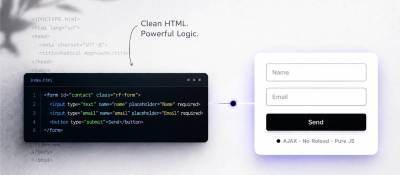
A free Joomla system plugin that turns plain HTML markup into AJAX feedback forms: email, file uploads, submission history, CAPTCHA-free antispam, Telegram, MAX, JivoSite and Verbox.
RadicalForm keeps the look of a form separate from its processing. The site developer writes the markup and styling — in a template, a module, a page builder or an online store product page — and the plugin adds AJAX submission, a CSRF token, validation, file uploads, notifications, history and antispam. It does not impose a CSS framework and does not need jQuery. This suits forms in modal windows, one-click order buttons and landing pages where several forms on one page should look different.
Features
- AJAX submission with no limit on the number of forms per page.
- Works in modal windows, with the option to close the window after submission.
- HTML5 validation, required fields, checkbox and multi-select fields.
- Per-form recipients, a custom email subject that can include any field, Reply-To, CC and BCC copies, and individual settings via
rfTarget. - Multiple file upload fields, storage control and attaching files to the email.
- History of regular and blocked submissions, with CSV export.
- Collection of allowed UTM tags, sent along with the form.
- Yandex Metrica goals set in the plugin interface.
- Antispam by timing, IP and content, a JavaScript browser check and limits on mass submissions, with no CAPTCHA.
- Integrations: Telegram, MAX, JivoSite, Verbox. Leads can be sent to amoCRM and Bitrix24 with the separate WT AmoCRM - RadicalForm and WT JoomShopping Bitrix24 PRO plugins.
- Email template overrides, custom PHP layouts and plugins of the radicalform group.
- Works correctly with Joomla caching and multilingual sites, with a separate form per language.
Creating a form
- Place an ordinary HTML form wherever it is needed. The recommended container is a
<form>tag; if the environment already outputs an outer<form>, use<div class="rf-form">instead, since forms cannot be nested. - Give the submit button the
rf-button-sendclass, withtype="button"inside a<form>. - Give every field to be sent a
nameattribute; fields without one are ignored. Theactionandmethodattributes are not needed. - Mark required fields with the
requiredclass or the standard HTML5 attributesrequired,typeandpattern.
A field's label in the email and history comes from its name. To translate it, create a Joomla language override: for name="phone", a PHONE constant. Reserved Joomla names (option, plugin, group, format, module, template, method) cannot be used.
Setup after installation
- For email, keep the Send email option enabled and enter the main address, plus CC, BCC, Reply-To and alternative recipients if needed.
- Check the CSS classes for invalid fields and upload errors; the defaults suit Bootstrap and UIkit.
- Check JavaScript #2, which runs after a successful submission and by default shows the message with
Joomla.renderMessages(). - Enable only the integrations, file uploads, UTM tags and antispam mechanisms that are needed.
Basic HTML knowledge is required to work with the plugin.
Compatibility and requirements
- Joomla 5.2 or later, including Joomla 6.
- PHP 8.2 or later.